
When we talk about Artificial Intelligence and its applications, most discussions revolve around business productivity, content creation, coding, research, data analysis and automation. As we are engrossed by all of this, consequently, we do sometimes overlook areas in our everyday personal lives that can also be enriched using the same AI tools.
Recently, I experimented with ChatGPT while renovating a wall in my living room. What started as a simple exercise to explore interior design ideas turned into an interesting demonstration of how AI can help translate our thoughts and preferences into something visual and practical. I uploaded photographs of my living room, shared reference images of designs and materials I liked, and gradually refined the proposed design through a series of conversations with ChatGPT.
The result was a visual representation that came remarkably close to the final design we eventually implemented. There were some differences, of course, but the experience made me realise that AI can be a useful tool even when we are making relatively ordinary personal decisions.
Let me explain how I went about it.
The challenge: Visualising a design before implementing it
Anyone who has undertaken a home renovation or interior design project will probably relate to this. One can have ideas or might have seen an interesting design online (Pinterest, Instagram etc) or even at someone’s home. You may also have shortlisted certain materials, colours, lighting fixtures and decorative elements.
But how do you know whether all these individual elements will look good together in your own home?
You can collect reference photographs and show them to an interior designer or carpenter. You can also try explaining your ideas verbally. However, translating these references into a picture of what the finished room might actually look like is not always easy.
This was the situation I found myself in as I wanted to redesign the feature wall in my living room, which sits behind the seating arrangement. I had some ideas about the colours, wall treatments and lighting, but I wanted to experiment with different combinations before finalising anything. Instead of relying entirely on my imagination, I decided to use ChatGPT to visualise the possibilities.
How I used ChatGPT to design my living room wall
The process was fairly straightforward. I did not use any specialised interior design software or require any knowledge of graphic design. Everything happened through a normal conversation with ChatGPT, using photographs and reference images.
Here is how the process unfolded.
Step 1: Start with a photograph of your actual space
I started by uploading photographs and a video of my living room.
This is an important distinction. I wasn’t asking ChatGPT to design a generic living room. I wanted it to work with my actual room, including its dimensions, existing furniture, flooring, windows and overall colour scheme.
The photographs gave ChatGPT a visual reference of the space. I could then discuss possible changes while keeping the existing surroundings in mind.
Step 2: Experiment with wall designs
I started sharing reference images of wall treatments that I liked. One of the designs featured dark-brown decorative panels. I asked ChatGPT to incorporate the design into my living room and show me how it would look.
This gave me an initial visualisation. I could now evaluate the proposed design in the context of my actual room rather than trying to imagine how a reference photograph might translate into my home.
Step 3: Introduce actual products and reference images
This was probably the most useful part of the exercise. I shared photographs of specific lighting fixtures that I had shortlisted and asked ChatGPT to replace the existing lights in the generated design.
I subsequently shared another reference image for the central portion of the wall and asked it to replace that with the new design. The process involved simple instructions accompanied by photographs.
I didn’t need to describe the exact shape, colour or finish of every element. I could simply show ChatGPT what I had in mind.
Step 4: Refine the design through conversation
Once the main design started taking shape, I continued making changes. I experimented with different combinations and asked ChatGPT to modify individual elements while retaining the overall composition.
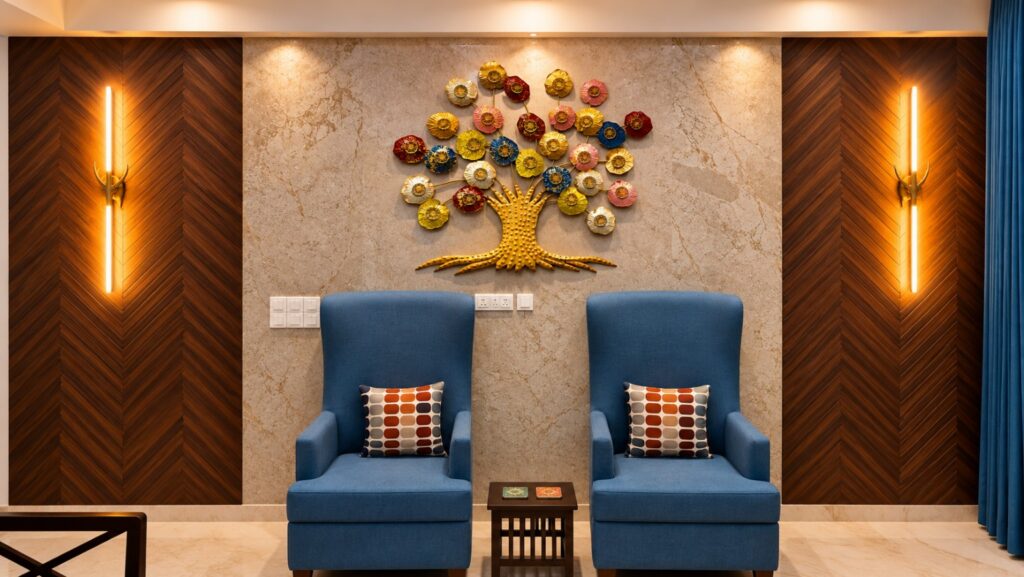
Eventually, the generated design brought together:
- Dark-brown decorative panels on either side.
- A lighter beige central section.
- Decorative wall lighting.
- The blue high-back chairs.
- A colourful decorative tree in the centre – an existing fixture, which was ultimately removed from the final implementation.
The important thing was that I could keep refining the image rather than starting from scratch every time I wanted to change something.
The final result: AI-generated design versus reality
This is where the experiment gets particularly interesting. After the renovation was completed, I took another photograph of the living room and compared it with the image generated by ChatGPT.
Here are the two images.
The design visualised using ChatGPT
The actual completed living room
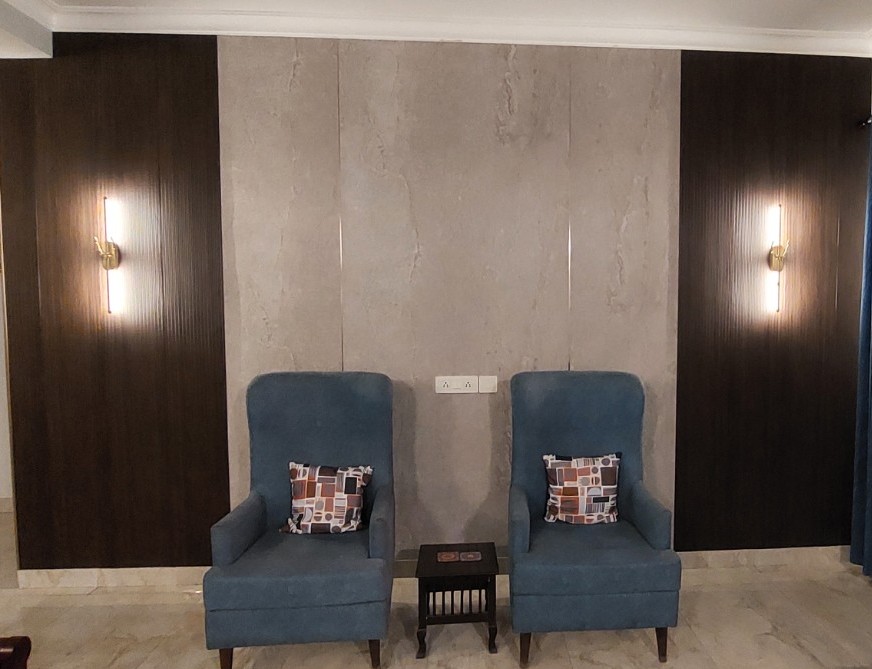
The AI-generated concept and the completed living room. While some details changed during execution, the overall design, colour combination and placement of the main elements remained remarkably close to the original visualisation.
When comparing the two, there are several similarities worth highlighting.
1. Overall composition
The arrangement of the wall was represented very closely. The two darker panels on either side and the lighter central section were retained in the actual installation.
2. Colours and materials
The combination of dark brown and beige was very close to what we eventually implemented. The actual central finish has a subtler stone texture, while the AI-generated version shows a more pronounced pattern.
3. Lighting
The positioning of the lights on the two dark panels was represented correctly. The actual fixtures have a slightly different appearance and the generated image depicts more dramatic illumination.
4. Furniture
The blue chairs were also represented quite accurately. Their placement and the overall colour combination were close to the actual room.
5. The differences
There were a couple of deliberate changes. The AI-generated image featured a chevron pattern on the dark panels. We eventually opted for plain dark-brown panels instead. The decorative tree in the centre was another element that we decided not to include in the final installation.
The generated image also had a more polished, showroom-like appearance, with dramatic lighting and a more pronounced finish. Nevertheless, the broad design concept was retained.
For me, the most important outcome was that the AI-generated image had helped us visualise the proposed design before the work was undertaken. It gave us a reference that could be discussed with the people executing the renovation and helped us make decisions about the different elements.
What made this experience useful?
Looking back at the exercise, there were a few things that I particularly appreciated.
1. Experimenting without making a financial commitment
Home renovation decisions can be expensive to reverse. Changing a wall treatment, replacing materials or moving lighting fixtures after installation involves additional costs and effort. With AI, I could experiment with different possibilities before committing to a particular design.
I could explore alternatives without purchasing samples or asking someone to prepare multiple physical mock-ups.
2. No specialised software or technical knowledge required
I did not need to learn professional interior design software or understand complicated graphic design tools. All I needed was a photograph, a reference image and the ability to explain what I wanted. This makes the technology accessible to people who may have interesting ideas but lack the technical skills to visualise them.
3. The ability to make changes through conversation
The conversational aspect was particularly useful. I could ask ChatGPT to replace a particular light, change the central design or add a decorative element. This is quite different from working with a traditional design tool, where making changes may require several manual steps.
Of course, the generated images were not always perfect, and sometimes elements that I wanted to retain would change unintentionally. But I could correct these through further instructions.
4. Better communication with the people executing the work
Perhaps one of the more practical benefits was having a visual reference that I could share with the people working on the renovation. Explaining a design verbally can be difficult. A photograph showing the intended arrangement makes the discussion considerably easier. It also provides a common reference for the homeowner, carpenter, electrician and interior designer.
Other everyday applications of AI
The living room experiment got me thinking about how many other personal activities could benefit from similar applications.
Here are a few possibilities.
1. Home improvement and interior design
You could upload photographs of your kitchen, bedroom, balcony or garden and experiment with different designs. Want to see how your kitchen might look with different cabinet colours? Or whether warm ivory curtains would work better than blue ones?
You can explore these possibilities before making a purchase.
2. Personal styling and clothing
You could share photographs of clothing combinations and ask AI to suggest alternatives. It could help you experiment with colours, styles and combinations for different occasions.
3. Holiday planning
AI can help you build travel itineraries based on your interests, available time and budget. You can share photographs of destinations, discuss possible routes and ask for suggestions about how to organise your trip. You can also use AI to compare accommodation options and plan activities for different members of the family.
4. Children’s education
Beyond answering academic questions, AI can help children understand complicated concepts through illustrations, examples, quizzes and interactive explanations. Parents can also use it to create customised learning activities based on their children’s interests and learning levels.
5. Garden and outdoor planning
If you have a garden, terrace or balcony, you could upload photographs and experiment with different plant arrangements, pots, seating options and landscaping ideas. You could even ask AI to suggest ways to make better use of limited space.
These are just a few examples. The possibilities are extensive, particularly when we combine image generation with conversational AI.
Some limitations to keep in mind
While my experience was positive, there are a few things worth remembering.
AI-generated images are not technical drawings. An image may look convincing without accurately representing dimensions, material specifications or installation requirements.
The quality of the input. Photographs taken from useful angles, along with clear reference images, can make the exercise more productive.
Be specific with your instructions. Rather than asking AI to redesign everything repeatedly, identify the particular element you want changed. This generally makes the process easier to manage.
Check the output carefully. AI may unintentionally modify elements that you wanted to retain. Generated images can also introduce details that are not physically practical.
Use professionals where required. Structural modifications, electrical work, measurements and material specifications should be verified by qualified professionals. AI can help with visualisation and decision-making, but it should not replace professional expertise where technical accuracy and safety are involved.
To conclude, I would encourage anyone who has only used ChatGPT for asking questions or generating text to experiment with uploading photographs and reference images. Start with something simple. It could be a wall you want to redesign, a room you want to rearrange or a garden you want to improve.
You may discover that AI can be a useful partner in solving some of the everyday challenges that you encounter. And sometimes, as I discovered with my living room renovation, it can help you see the final result before you even begin.
 Bhavya Banga